Search the Highslide website

Testimonials

This is the single best usability improvement I've seen in image viewing since the digital age. For instance, the company [XXX] just bought [YYY], for all the whiz-bang, simply cannot (in my opinion) rival the elegant and beautiful, yet powerful simplicity of your creation. I congratulate and thank you sincerely. It is an added bonus that you have made your creation available under such a non-restrictive licence. I hope your usability talent is well-appreciated.
Janos, Budapest
Highslide is an outstanding piece of work, and I’m particularly impressed by how you’ve dealt with issues such as browser compatibility and accessibility without compromising on functionality. I’ve been trying all weekend to find where the limitations are, but you seem to have covered everything, and in an elegant manner too – well done!
Gary, UK
Again, I am truly appreciative and impressed by your quality of product, level of support, technical abilities, and willingness to help. It is for all these reasons that I am enamored by your product and customer support. It is also for these reasons that I am purchasing a license for your software.
Sean Dempsey
We've been looking at a way to enhance our ecommerce and photography software for some time, and were lucky enough to stumble upon Highslide JS. Integration was incredibly straight forward, the documentation and examples meant that we could very quickly decide on the best way forward for our own application, and within an hour we had rewritten our own software to include the Highslide JS functionality as standard. We've tested it on several browsers across several platforms and it works perfectly so far, with no hanging around waiting for java applets to install or inconvenient cabfile installations. We would have no hesitation whatsoever in recommending Highslide to anyone who is considering taking a huge leap forward with their image galleries. Excellent work Torstein, thank you!
Mark Reid
Director, Three Ravens Ltd
First of all: this is one of the best javascripts I've ever encountered. Very useful, customizable and rock solid. You are doing a fantastic job, Torstein. (...)
(...) And that's not all ... you're on this forum answering all those questions with such patience. What a saint.
Highslide JS Gallery is a unique way of modern presentation of any kind of products' pictures. It allows the whole content of web site to be more attractive and user friendly. Highslide JS is incomparably better alternative to other well known and rather common lightbox scripts. We recommend Highslide JS for anyone who wants to shine!
The Highslide Editor is freaking outrageous. Just plain awesome. THE best editor for js libraries I've ever seen (and used). Beats everything. The whole concept and outlining is so well thought-out. And the fact that the preview is updated instantaneously is simply outstanding. Given the complexity of Highslide itself this must have been a tremendous amount of work.

What is Highslide JS?

Highslide JS is an open source image, media and gallery viewer written in JavaScript. These are some of its advantages:

New!

Use the visual Highslide Editor to set up your Highslide installation without writing code.

  • Quick and elegant looking.
  • No plugins like Flash or Java required.
  • Popup blockers are no problem. The content opens within the active browser window.
  • Single click. After opening the image or HTML popup, the user can scroll further down or leave the page without closing it.
  • Lots of configuration options and scalability without compromizing on simplicity. A component system lets you strip away unused features down to a filesize of 10kB.
  • Outstanding, unconditional and free user support for both commercial and non-commercial users.
  • Compatibility and safe degrading. If the user has disabled JavaScript or is using an old browser, the browser redirects directly to the image itself or to a given HTML page.

Examples

Highslide JS core

Highslide JS
This instance uses graphic outlines to create a rounded border with a drop shadow. Full HTML captions can be assigned to each image.
Highslide JS
You can add a caption below the expanded image. Use CSS to style the borders and captions. This image also has a Mac-style close button overlaid in the top right corner.
Highslide JS

Caption on the right

You can open more than one image at a time, and arrange them on your screen by dragging them around. The captions can be positioned anywhere relative to the image.
Highslide JS
The images by default try to expand equally in all directions from the thumbnails, but you can also position them in the center like this case. Or you can for instance specify a 200px left margin to keep your menu visible, or anchor the image to one corner of the thumbnail.

With Gallery

With HTML

HTML content
This example uses the htmlExpand method to display full HTML content in the expander. The width of the expanding div is set to 300px, while the height is omitted to allow Highslide to decide the best fit.

In the expander you can put all kinds of content, for instance form elements.
Scrolling HTML content
Powered by Highslide JS

More examples

  • The Barebones examples.
  • The Configurator contains more examples, combined with the possibility to make your own customized version of Highslide by adding or removing components.
  • Several articles in the API reference have good live examples.

License

Creative Commons License Highslide JS is licensed under a Creative Commons Attribution-NonCommercial 2.5 License. This means you need the author's permission to use Highslide JS on commercial websites.

Non-commercial

Commercial Single Website

Commercial Unlimited

Free
$29
$179
Do you want to use Highslide for a personal website, a school site, your family's photo album or a non-profit organisation? Then you don't need the author's permission, just go on and use Highslide.
If you want to use Highslide for a commercial website, you get the author's permission by filling in the domain name in the "Buy now" page and paying the fee.
What is a single website?
A single website is defined as a collection of web pages that serve a single entity. So for instance if you have a subdomain defined as customer.xyz.com and www.xyz.com we would consider this a single web site and you can have any number of subdomains. The only exception to this is if you are hosting a web application or websites where the subdomain is providing customer specific data. This would require a commercial unlimited license.
The unlimited permission entitles you to use all future versions of Highslide on all sites you develop in the future, for yourself or your customers, at no further charge. It can also be used for software products that don't compete to Highslide directly. For any questions please contact the author.
Donate
Buy now Buy now

What is a commercial website?

A commercial website is a website which purpose is generating revenue or cash flow of any type, and that isn't under a non-profit organization. So if you're selling a product, selling advertisement, selling a service or just marketing a commercial business, your site is commercial. A company website is also commercial even if it doesn't sell anything, as it's purpose is to front a commercial company.

Redistribution

You are allowed to distribute Highslide JS with non-commercial packages given that you fulfill two conditions:

  • Emphasize to your users that Highslide JS is not free for commercial use. You can do this on your download page or when your users activate Highslide in your application.
  • Provide a link back to this web page in the same location.

Implementations

These are some third party sites offering plugins and other implementations of Highslide into other systems. If you know a plugin that's not in the list, please send me an email through the "Contact" link in the main menu. Some of these implementations use old versions of Highslide, so you should upgrade to the latest version before you use them in a production environment.

System Name Comment
Adobe Lightroom The Turning Gate Highslide Gallery Use Highslide to present your Lightroom galleries.
ASP.NET 2.0+ Highslide JS .NET Makes implementing Highslide in ASP.NET extremely easy.
Coppermine Highslide for Coppermine Integrates Highslide into Gallery
DotNetNuke Live Content DotNetNuke module which uses Highslide to overlay pictures, videos, flash, content (text/html), DotNetNuke modules, and external content (iframe)
metaPost Uses Highslide to easily provide stunning Web 2.0 styled effects when publishing content from MetaWeblog enabled clients such as Windows Live Writer to DotNetNuke
Drupal Drupal Highslide module A Drupal module for Highslide
ImageFlow ImageFlow with Highslide JS Description for how to combine Highslide JS and the popular ImageFlow script
iWeb Highslide JS in iWeb Instructions for how to install Highslide under iWeb
Video tutorial for iWeb Video tutorial for installing Highslide under iWeb
Jalbum Jalbum skins Several Jalbum skins use Highslide JS, including Boxer, Matrix, Profiler and Siteli.
Joomla Core Design Image Revolution Gallery plugin
Highslide JS for Joomla Supports most Highslide features
JA Highslide Insert all kinds of Highslide contents
JoomSlide Creates thumbnails automatically in your content using HighSlide to expand the image.
My dynamic photo gallery for Joomla Autogenerates thumbs and slides
Magento How to install Highslide in Magento Step by step tutorial
Installation instructions for Magento A step by step tutorial
PHP-Fusion HS Gallery Adds Highslide to the existing gallery in PHP-Fusion
PHPBB PHPBB Attatchment Zoom/Slideshow Mod Use Highsldie zooming and slideshow functionality for displaying attachments.
Picasa Highslide Photo Gallery and Slideshow for Picasa Gallery template
SMF Highslide Image Viewer Modification for Simplemachines Forum
Typo3 Highslide Gallery Typo3 extension
vBulletin Highslide for vBulletin attachments Replaces vBulletin's popups with Highslide
Wordpress Highslide Integration Zero-click-solution to zoom images with Highslide JS
Post-Thumb revisited Thumbnail management system
Wordpress Highslide JS Plugin
ZenCart Numinix Highslide Gallery Allows Zen Cart websites to display main and additional product images with Highslide.

Installation

Note: some basic HTML knowledge is required to install Highslide. For any problems in your installation, see Highslide support.

Alt. 1: Installation using the Editor

The Highslide Editor is a visual tool that lets you configure most of the numerous Highslide options without writing code, and upload the results directly to your web server. This is not only a great help for non-developers, it also saves time for professionals who don't have to read through the API documentation to get things done. Go to the Editor.

Alt. 2: Manual installation

  1. Download and extract the zip-archive from the download page.
  2. Run the file index.html, navigate to your favourite setup and view the source.
  3. Change the file to suit your needs, or copy and paste parts of it into your HTML file. If you mess it up, go back to the original file and change it bit by bit. Study the documentation and the API reference for advanced features.
  4. If you move the Highslide JS files, remember to change the graphicsDir setting in the Javascript.

Example of a manual installation

In this example the zip archive is unzipped to the root of your website. In addition, the CSS code from your favourite example is copied and pasted into a file called highslide.css and placed in the /highslide directory.


1) For this example, your directory structure should look like this: Highslide directory structure
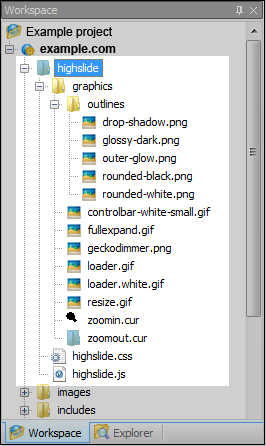
2) Put this code in the head tag of your HTML page.
<script type="text/javascript" src="/highslide/highslide.js"></script>
<link rel="stylesheet" type="text/css" href="/highslide/highslide.css" />
<script type="text/javascript">
    // override Highslide settings here
    // instead of editing the highslide.js file
    hs.graphicsDir = '/highslide/graphics/';
</script>


3) This is how you mark up the thumbnail
<a href="images/full-image.jpg" class="highslide"
        onclick="return hs.expand(this)">
    <img src="images/thumbnail.jpg" alt="Highslide JS"
        title="Click to enlarge" height="120" width="107" /></a>

Compatibility - tested with:

IE 5.5 - 8.0 Works
IE 4.0 Falls back nicely
Firefox 1.5 - 3.5 Works
Opera 8.5 - 10.5 Works
Netscape 7.2 Works
Netscape 4.79 Falls back nicely
Safari 2.0 - 4.0 on Mac, 3.0 - 4.0 on Windows Works
Google Chrome Works
Konqueror 3.5 Works

Showcase

See how developers implemented Highslide on their own sites in this thread.

Translations

Get or share translated GUI strings in this thread.

Get Highslide

Download!

News

Highcharts - A new JavaScript charting library

Nov 27, 2009 - 3:26pm
Today I am happy to announce the release of Highcharts, a pure JavaScript charting library. Check out the new program at http://www.highcharts.com.

The Editor is launched

Jul 20, 2009 - 4:07pm
The Highslide Editor is a visual tool that lets you configure most of the numerous Highslide options without writing code, and upload the results directly to your web server. This is not only a great help for non-developers, it also saves time for professionals who don't have to read through the API documentation to get things done. The Editor is a pure web application based on Ext JS.

Visual Editor beta testers wanted

Apr 30, 2009 - 3:15pm
Today the first beta of the Highslide Editor was released. The Editor is a visual interface for setting up and publishing your Highslide popups and galleries. It will not only make it much easier for non-coders to implement Highslide, but also make it a lot faster for experienced coders. Bugs can be reported in this topic or in the new dedicated Highslide Editor forum.

Read older news

eXTReMe Tracker